Switching to a Keyboard-First Terminal-Based Workflow
For the past six months my whole dev workflow has lived on a single screen. Most of the time that’s the laptop. Sometimes I plug into an external monitor, but then the external is the only screen I look at, and the laptop sits closed on a stand acting more like a CPU than a display. Either way, one screen. Keyboard for everything. Terminal for everything. No IDE.
At work I used to run two displays. Laptop on one side, external on the other, with apps mapped to real estate by zone: browser on the external, editor center, Slack on the laptop, terminal floating somewhere. It looked organized. It wasn’t.
This post is about the setup that replaced it. Why I built it the way I did, what it actually is, and what six months of living inside it has felt like.
The argument
Three convictions hold the whole thing together.
Single screen. You can only focus on one screen at a time, so a second monitor doesn’t expand your focus; it just gives your eyes more places to glance. Something lights up on the laptop and you’ve lost your place in the editor on the other display. Even getting to what you glanced at is a chore: drag the cursor over, click to focus, alt-tab to hunt for the window. The “where was I?” tax just gets paid more often, on more screens. One screen flips that: it always shows what I told it to, and every switch is intentional.
Keyboard-first. The mouse is the slow lane. Reaching for the trackpad to click a tab, hunt for a window, drag a divider. Every one of those motions is a microsecond of friction and a thought interrupted. A keybinding is instant, deliberate, and stays in muscle memory. Once you’ve felt how fast a keyboard-driven workflow can be, mouse-driven anything feels like wading through syrup.
Terminal over IDEs. IDEs force their own opinions on how you work, and they churn: I liked Cursor until it started rearranging its UI every other week and pushing a chat panel in front of the code. They’re also tied to a language, so working across a Java service, a TypeScript app, and a Python script means juggling IntelliJ, VS Code, and something else, each with its own keybindings. A terminal-first setup sidesteps all of it. Neovim handles every language the same way, and tmux gives me one session per repo with panes a keystroke apart. That matters more now that an AI agent is part of every task: the screen fills up fast, and nothing keeps it organized like tmux.
The stack
The setup nests. From the outside in:
- Aerospace: tiling window manager for macOS. Five workspaces, each holding a specific app: browser, terminal, Slack, mail/calls, and a misc bucket. Whatever lives on the workspace I’m on is all I see.
- Kitty: my terminal emulator, though it could be any emulator with the basics Neovim and tmux lean on: true color, undercurl for diagnostics, and italics. I picked it for the feel: snappy, clean ligature rendering, native cursor trails. The config stays light. Most of the heavy lifting happens one layer down, in tmux, which is platform agnostic.
- Tmux: runs inside Kitty. One session per repo, a single keystroke to jump between them. Each session splits into windows, each window into panes.
- Neovim: the left pane of every session, where I write code.
- AI agent: the right pane. Editor and agent side by side, a keystroke apart.
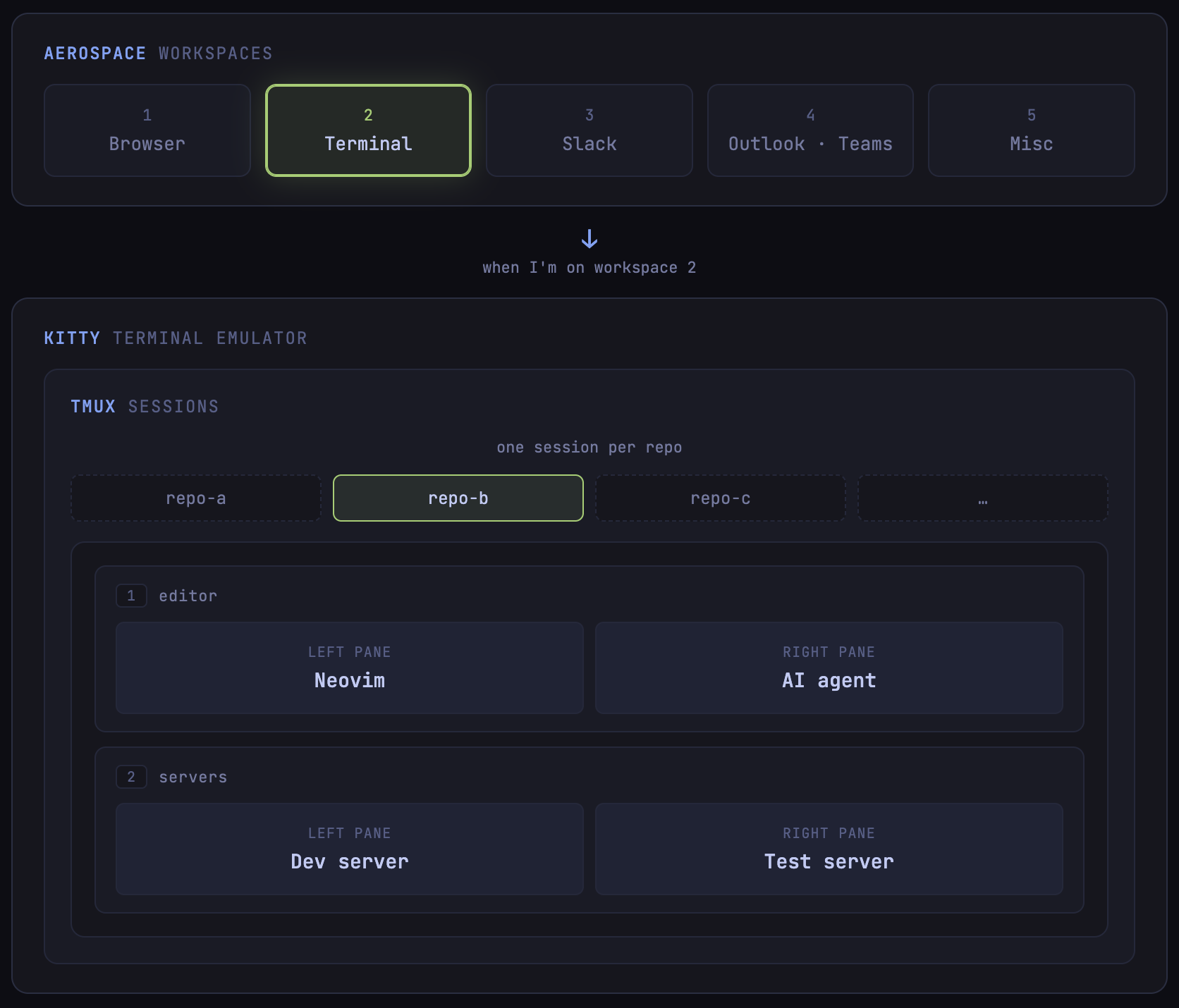
The setup nested from the outside in: Aerospace holds the workspace, Kitty runs tmux, and each tmux session puts Neovim and the agent side by side.
Theming and keybindings
Two things keep five separate tools from feeling like five separate tools.
Tokyo Night, everywhere. the Sketchybar menu bar, Kitty’s theme, tmux’s status line, Neovim’s colorscheme, the Oh My Posh prompt, even fzf. Same palette across all of them. It just feels cohesive.
A semantic keybinding system, with vim motions where they belong. Each layer owns its own prefix:
Ctrl+*→ Aerospace (workspaces, window focus, modes)Alt+*→ Tmux (panes, sessions, windows)Leader+*→ Neovim (everything else)
Vim motions run through all three layers underneath. Pane navigation in tmux, window navigation in Aerospace, normal usage in Neovim. After a few weeks I stopped thinking about any of it.
Six months in
What I enjoy most is what’s gone: the hunting. My old setup meant fishing for the right window, cycling through desktops or dragging the mouse across two screens to remember where things were. Now every app has one fixed workspace a keystroke away: browser, Slack, mail, the jump back to code. I don’t look for any of it; I just go.
Inside the terminal it’s all one fabric. tmux and Neovim share the same vim motions, so the same handful of keys edits text, moves between panes, and switches windows, hands never leaving home row. Every repo feels identical too, same editor and motions whether it’s a Java service, a TypeScript app, or a one-off SQL query. The clutter is gone, and what’s left is the work, quiet enough to drop into flow and stay there.
All of the config lives in my dotfiles repo.